REC
ISO 100F/2.81/250
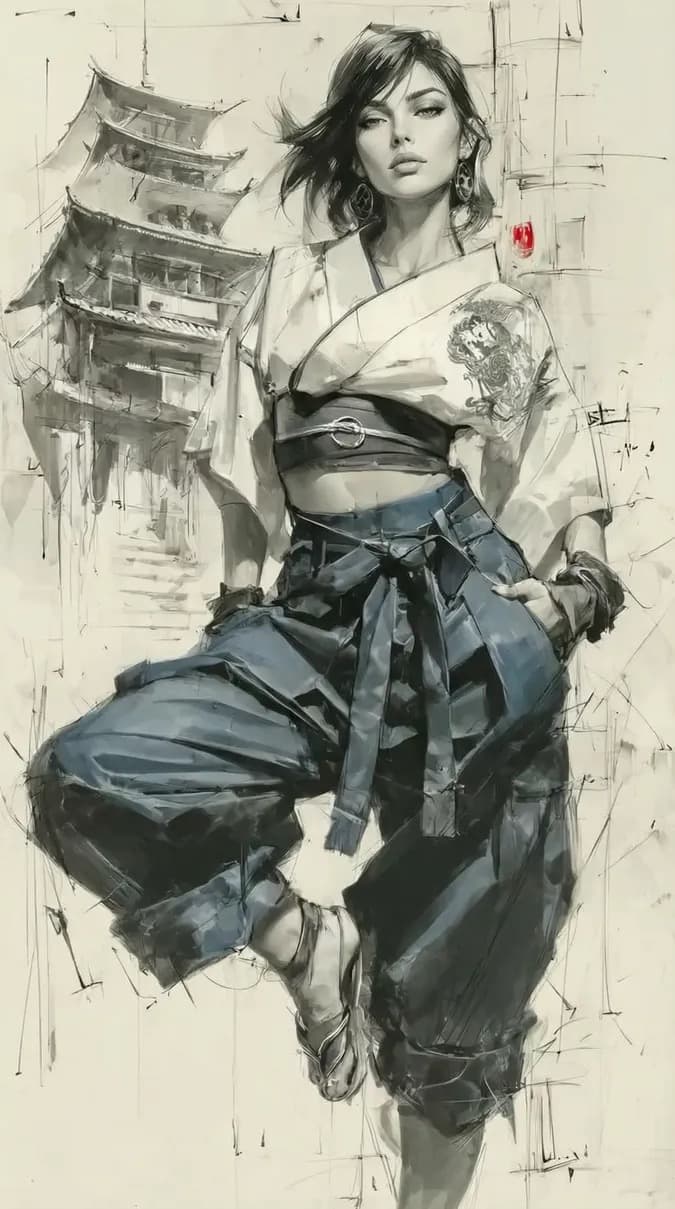
Double Exposure City
#lifestyle#virtual model#brand ambassador#professional#digital fashion#ai avatar#digital human
AI Model StyleFree to try
Prompt Used:
Image edit, face swap only.
Use @img1 as the base illustration: keep 100% of its artistic style, technique, composition and urban sketch mood. Replace ONLY the woman's face with the face from @img2 , rendered in the same graphic sketch style and matching the same angle, scale and confident focused expression.
Style & technique: digital graphic sketch illustration, muted palette — grey, black, beige — with small red color accents, mix of clean detailed figure rendering and loose fast architectural line work in background, painterly sketch quality, no photorealistic rendering.
Keep identical to @img1 :
– vertical frame, full-height figure positioned slightly right of center, elongated stylized proportions;
– one leg bent with foot touching ground, other leg straight, body slightly leaning — dynamic relaxed pose, both hands in trouser pockets;
– cropped kimono-style jacket or top with wide belt or sash at waist, tattoo-like ornamental pattern on one sleeve, long belt ties hanging down;
– wide gathered pleated trousers, light sandals with straps;
– large round or oval metal earrings visible;
– dark short-to-medium disheveled hair with strands swept to one side, dynamic free style;
– background: loose architectural sketch lines — multi-tiered pagoda with curved roofs on the left drawn in fast strokes, thin vertical and horizontal construction-like lines on the right, small red accent element near right lines, minimal and schematic overall.
Face: redraw @img2 features (eyes, brows, nose, lips, jawline) in the same graphic sketch style — almond-shaped eyes with dark lash line, slightly narrowed confident gaze directed forward and slightly downward, clean cheekbones, neat lips, calm assured expression — rendered with clean sketch lines consistent with the detailed figure style, not photographic.
Negative: photorealistic face, changed hairstyle or hair direction, altered jacket or trouser style, removed belt or sleeve ornament, changed earrings, removed pagoda or background line work, loss of red accent, color palette shift to full color, heavy digital smoothing, 3D CGI look, text, watermark, logo.
About This Double Exposure City Style
This visual artwork was created using PhotoForge AI's advanced portrait rendering pipeline. It combines studio lighting physics, depth-of-field simulation, and realistic facial preservation technology. You can apply this exact aesthetic to your own photos, change the background, customize outfits, or build complete AI photoshoot packs in seconds.
Step 1
Upload Your Photo
Select a clean front-facing selfie or portrait from your camera roll or desktop.
Step 2
Apply Style & Prompt
Use this pre-configured prompt or tweak the lighting, clothing, and background parameters.
Step 3
Export in 4K Ultra-HD
Download high-resolution 4K exports ready for LinkedIn, Instagram, Tinder, or commercial use.
Want to explore more AI tools?