REC
ISO 100F/2.81/250
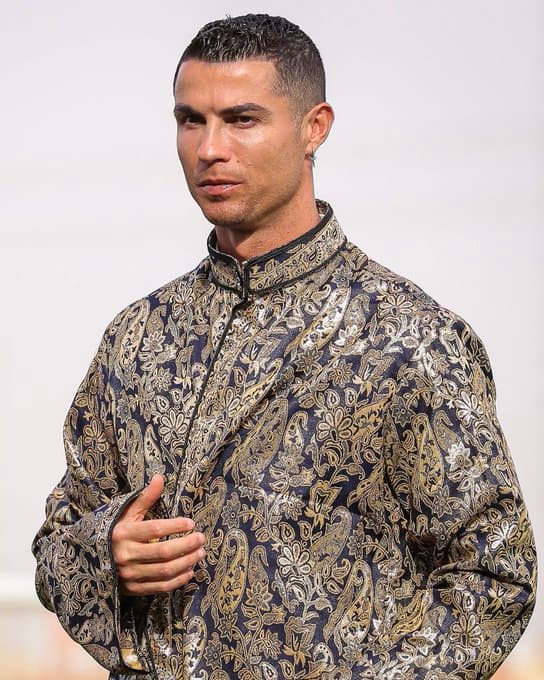
Recreate a shot that looks like this
#influencer marketing#digital fashion#brand ambassador
AI Model StyleFree to try
Prompt Used:
(photorealistic:1.5), (masterpiece, best quality:1.4),
*** ABSOLUTE IDENTITY OVERRIDE — READ BEFORE GENERATING ANYTHING ***
*** THE ONLY VALID FACE IS FROM THE USER REFERENCE PHOTO ***
*** THE ONLY VALID HAIR COLOR AND TEXTURE IS FROM THE USER REFERENCE PHOTO ***
*** THE ONLY VALID SKIN TONE IS FROM THE USER REFERENCE PHOTO ***
*** THE SCENE IMAGE IS A POSE, OUTFIT, AND BACKGROUND BLUEPRINT ONLY ***
*** IGNORE THE SCENE MODEL’S FACE ENTIRELY ***
*** BUILD USER IDENTITY FIRST — THEN DRESS AND PLACE IN SCENE ***,
*** STEP 1 — BUILD USER IDENTITY ***
(exact facial identity from user reference:1.6), (user’s bone structure:1.6), (user’s eye shape and iris color:1.6), (user’s nose bridge and lip geometry:1.6), (user’s exact skin tone applied to face neck hands:1.6), (user’s exact hair color and texture:1.6), *** ALL facial details — orbital depth — jaw angle — lip geometry — eye fold — iris color — skin tone — extracted ONLY from user upload — NOT from scene image ***,
*** STEP 2 — APPLY SCENE HAIR STYLING TO USER’S HAIR ***
*** user’s exact hair color and texture — styled into very short tapered fade — textured top with wet-look gel shine — neatly lined edges — side fade taper — NOT scene model’s hair color — USER HAIR COLOR AND TEXTURE IN THIS CUT ***,
*** STEP 3 — PLACE USER IN SCENE POSE ***
adult male, medium close-up chest-up portrait — slight three-quarter turn — head turned approximately 15 degrees to right — serious focused composed expression — right hand raised to mid-chest level thumb extended — eye-level camera — 4:5 framing,
*** STEP 4 — DRESS IN SCENE OUTFIT ***
(intricate black and gold paisley brocade tunic:1.5), *** OUTFIT MANDATORY: black base silk or brocade tunic — intricate gold champagne paisley and floral woven pattern throughout — metallic sheen on gold threads — mandarin collar with black piping — hidden front closure — tailored fit — complex teardrop paisley shapes — slightly reflective woven texture — small silver thin hoop earring right earlobe — ALL exact ***,
*** STEP 5 — SCENE ENVIRONMENT ***
neutral light grey-white blurred background — ambient daylight from top-front right — soft moderate shadows — specular highlights on garment and hair — shallow DOF high bokeh — neutral daylight white balance — well-exposed portrait,
(subject in sharp focus:1.5), (perfect anatomy:1.5), (visible pores on nose and cheeks:1.4), (user skin tone warm olive medium tan on face neck hands:1.5), (facial stubble from user reference if present:1.4), (right hand vein definition knuckles visible:1.4), (metallic gold thread sheen on brocade:1.5), (mandarin collar black piping exact:1.4),
*** CRITICAL CHECKS ***
*** FACE must match user reference instantly and unmistakably ***
*** HAIR must be user’s color in this short tapered style ***
*** SKIN TONE must match user reference — NOT scene model ***
*** BROCADE PATTERN must be complex intricate gold paisley — NOT simplified ***
*** WATERMARK: “by photoforge.app” Great Vibes calligraphic font bottom-right 5% height white black drop shadow — MANDATORY ***
(wrong face:1.9), (scene model face:1.9), (wrong hair color:1.9), (scene model hair:1.9), (wrong skin tone:1.9), (scene model skin:1.9), (simplified brocade pattern:1.7), (missing mandarin collar:1.7), (missing gold paisley:1.7), (missing earring:1.6), (beauty filter:1.6), (skin smoothing:1.5), (body reshaping:1.5), (AI glow:1.4), (HDR:1.3), (missing signature:2.0), *** USER FACE — USER HAIR COLOR — USER SKIN TONE — ALL FROM USER REFERENCE ONLY — SCENE MODEL IRRELEVANT — MISSING SIGNATURE IS CRITICAL FAILURE ***.
About This Recreate a shot that looks like this Style
This visual artwork was created using PhotoForge AI's advanced portrait rendering pipeline. It combines studio lighting physics, depth-of-field simulation, and realistic facial preservation technology. You can apply this exact aesthetic to your own photos, change the background, customize outfits, or build complete AI photoshoot packs in seconds.
Step 1
Upload Your Photo
Select a clean front-facing selfie or portrait from your camera roll or desktop.
Step 2
Apply Style & Prompt
Use this pre-configured prompt or tweak the lighting, clothing, and background parameters.
Step 3
Export in 4K Ultra-HD
Download high-resolution 4K exports ready for LinkedIn, Instagram, Tinder, or commercial use.
Want to explore more AI tools?